How to Import TCX Files into Garmin for Enhanced Training
Par Sarah Publié le 15/10/2025 à 08h01 Temps de lecture : 4 minutes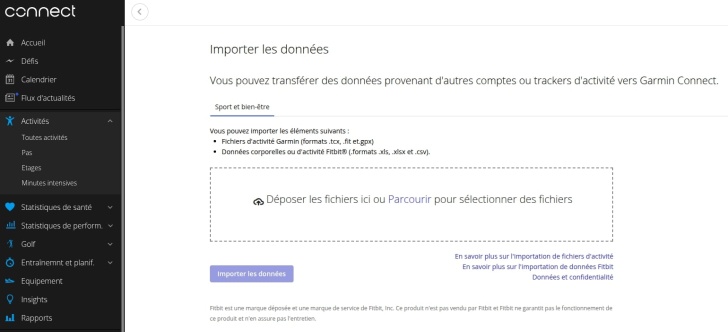
Understanding TCX Files and Their Importance
As endurance athletes, optimizing your training is key to achieving your goals, whether you're a triathlete, trail runner, cyclist, or swimmer. Training with precise metrics can significantly impact your performance. One of the most beneficial file formats to utilize is the TCX file, or Training Center XML. This format enables you to log workouts and share detailed data regarding your training sessions.
In this comprehensive guide, we will cover how to easily import TCX files into your Garmin device. Doing this efficiently allows you to capitalize on your training data, enhance your performance, and streamline your preparation for races.
What is a TCX File?
A TCX file is a specialized XML-based file format developed by Garmin. It is primarily used to store workout data, including detailed statistics such as duration, pace, heart rate, elevation gain, and even GPS coordinates for outdoor activities. The file format's primary function is to allow seamless compatibility with various Garmin devices and provide a straightforward way to transfer workout data between devices and applications.
- Workout Metrics: TCX files contain comprehensive workout metrics, making them an excellent resource for performance analysis.
- GPS Tracking: For trail runners and cyclists, the GPS data recorded in a TCX file can help analyze routes and segments.
- Heart Rate Data: The files can include heart rate stats, helping athletes monitor intensity and recovery.
Why Import TCX Files into Garmin?
Importing TCX files into your Garmin device allows you to leverage your training data effectively. Here are several reasons why this process is crucial for endurance athletes:
- Better Data Analysis: By importing TCX files, you can analyze your performance metrics in detail. This data understanding is essential for identifying areas for improvement.
- Enhanced Training Plans: Once your workouts are logged, you can refine your training plans based on detailed insights derived from your data.
- Seamless Device Integration: Garmin devices are designed to work impeccably with TCX data, ensuring a smooth user experience during workouts.
- Prepare for Competitions: Having an accurate record of your training through TCX files can help you prepare more effectively for races.
How to Import TCX Files into Your Garmin Device
Following a series of simple steps can have you importing TCX files into your Garmin device in no time. The process encompasses using both your computer and your Garmin Connect account:
Step 1: Prepare Your TCX File
Before you start the import process, ensure your TCX file is saved correctly on your computer. Check the file name and location, as you'll need to reference this in the following steps.
Step 2: Access Garmin Connect
Garmin Connect is the web platform where you can manage your device and sync your data. Follow these steps to access it:
- Open a web browser.
- Go to the Garmin Connect website.
- Log in to your Garmin account or create a new account if you do not have one.
Step 3: Upload Your TCX File
Once logged into Garmin Connect, you can upload your TCX file:
- Click on the "Activities" tab in the main menu.
- Next, select "Uploads" from the dropdown menu.
- Click on the "Import Data" button.
- Select "TCX File" from the upload options.
- Locate and select your TCX file from your computer.
- Click on "Upload".
After a successful upload, you will receive a confirmation message, and your activity will appear in your Garmin Connect account.
Step 4: Sync to Your Garmin Device
Now that your data is uploaded to Garmin Connect, it’s time to sync it with your Garmin device:
- Ensure that your Garmin device is connected to your computer via USB or is connected to Wi-Fi (if supported).
- On your device, navigate to the menu and select "Settings".
- Select "Sync" to ensure all the latest data, including your newly imported TCX file, is available.
- If using Garmin Express, simply open the application and follow the prompts to sync your device.
Make sure that your Garmin device is updated with the latest software version to avoid any compatibility issues.
Tips for Effective Use of TCX Files in Training
Now that you've imported your TCX files let’s look at several tips to maximize their benefits:
- Regularly Log Your Workouts: Consistency in logging workouts with TCX files will help establish performance trends over time.
- Assess Your Data: Take the time to thoroughly analyze the data contained in your TCX files for better decision-making regarding your training plan.
- Use HR Zones: If your TCX file contains heart rate data, focus on training within your established HR zones for optimal performance improvements.
- Share with Your Coach: If you have a coach, provide them with your TCX files for a more informed approach to your training plan.
- Set Goals: Utilize the insights you gain from your TCX analysis to establish meaningful training goals for future sessions.
- Stay Updated: Ensure your Garmin device's software is up-to-date for the best compatibility with TCX files.
Common Issues and Troubleshooting Tips
While importing TCX files into your Garmin device is straightforward, you might encounter some challenges. Here are common issues and how to troubleshoot them:
File Format Issues
Ensure that your file is saved as a TCX file and not in another format. If you receive error messages, double-check the file extension.
Data Not Appearing
If your data doesn’t appear after syncing, try reconnecting your device and repeating the sync process. Also, make sure your TCX file is not corrupted.
Inaccurate Data Analysis
If you notice discrepancies in your reported metrics, verify that all necessary workout data was included in the TCX file before uploading.
Scientific Insights on Endurance Training
Importing and analyzing workout data is not just about tracking; it plays a critical role in endurance performance. A study conducted by Coyle et al. (2021) shows that athletes who data-analyze their workouts are more likely to optimize their training adaptations and achieve superior results. By using TCX files wisely, you not only track your progress but also strategically shape your training for better outcomes.
Final Words
Employing TCX files into your Garmin device is a powerful way to enhance your training as an endurance athlete. By leveraging detailed metrics from your workouts, you can make data-driven decisions that significantly impact your performance. Follow the outlined steps to seamlessly import TCX data and take your endurance training to the next level.
🧠 FAQ - How to Import TCX Files into Garmin
❓ What is a TCX file?
A TCX file is a Training Center XML file format used by Garmin to store workout data and metrics.
❓ How do I upload a TCX file to Garmin Connect?
Log into Garmin Connect, go to 'Activities', select 'Uploads', and then choose 'Import Data' to upload your TCX file.
❓ Can I sync my Garmin device without a computer?
Yes, you can sync your Garmin device via Wi-Fi if it supports this feature, or by using the Garmin Connect Mobile app.
❓ What should I do if the TCX file doesn't upload?
Ensure the file format is correct and try re-saving the TCX file or check for any internet connection issues.
❓ Can I analyze TCX data in other applications?
Yes, several fitness applications support TCX files for data analysis beyond Garmin Connect.
❓ How often should I import TCX files?
It is beneficial to import TCX files regularly, ideally after each workout, to keep your data updated for performance analysis.